XTROJET 620 - Troubleshooting
General product specifications
- Working time: up to 90 minutes.
- Water sensor feature
- Charging time 3-3.5 hours
- Self parking
- 2 filtration options (250 microns / 150 microns)

Troubleshooting
Problem: The propeller is clogged (4 blue lights flashing) and the robot stops. No suction.
Cause: The suction mouth is clogged. Debris tangled or blocking the propeller movement. The motor stops to prevent overheat.
Solution: Turn off the robot and remove all the debris blocking the movement of the propeller and blocking the suction mouth. Clean thoroughly, make sure no debris is left behind. Remove the propeller and clean beneath it.

Problem: The large wheel is jammed (4 red lights flashing) and the robot stops.
Cause: Debris tangled or blocking the movement of the wheel. The motor stops to prevent overheat.
Solution: Turn off the robot and remove all the debris blocking the movement of the propeller. Clean thoroughly, make sure no debris is left behind. Remove the wheel and clean the gap.

Problem: The robot is not covering the entire pool. Erratic movement or no movement.
Cause:
- The filter bag is not correctly installed.
- The pool filter pump is not turned off.
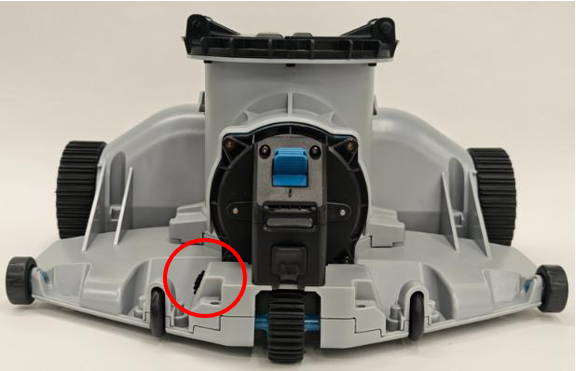
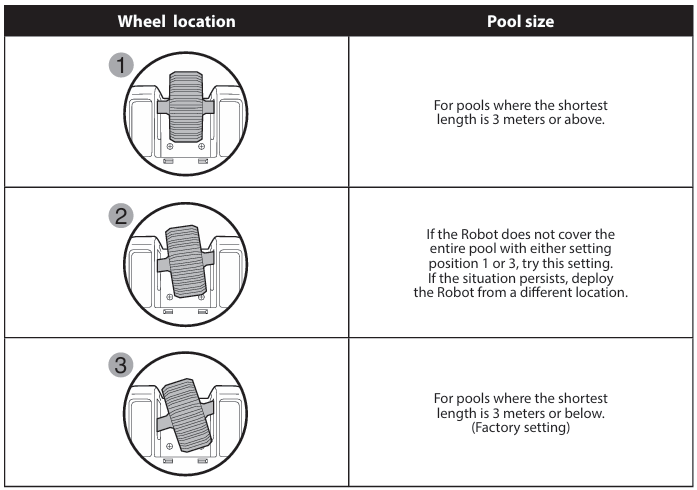
- The trajectory wheel is not in the correct setting.
- Slippery pool floor.
- Uneven pool floor.
- The sensor wheel is jammed.
- Dirty water sensor.
Solution:
- Install the filter bag in the correct position.
- Turn off the filter pump of the pool.
- Set the trajectory wheel according to the pool size.
- Remove large objects on the pool floor and ensure the floor is even.
- Check that the wheels can rotate smoothly. Remove any debris that is blocking the movement.
- Clean the water sensor.
Problem: Debris escape from the robot bottom.
Cause: The filter bag is full. The flaps of the to top cover is blocked by debris.
Solution: Empty the filter bag and remove any debris blocking the flap movement.
Problem: Not charging. Short working time.
Cause: Water in the charging port. The metal pins are dirty. The charger is not correctly installed. The charger is not functioning.
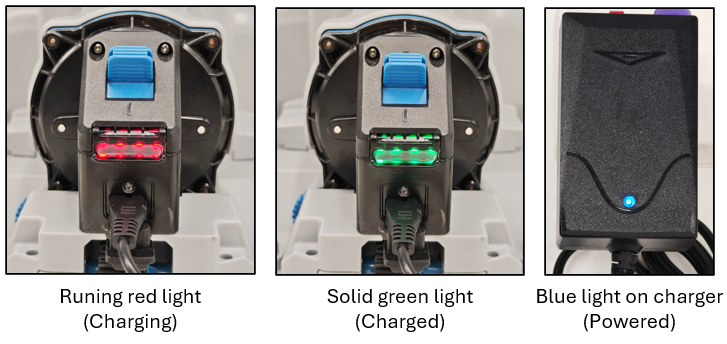
Solution: Ensure the charger and the power source is working. A blue light on the top of the charger indicates it is powered. Clean the metal pins of the charger and the robot. Ensure the charging port is dry and clean before connecting the charger.
Problem: The power switch is jammed. Difficulty to slide the switch.
Cause: Sand and other fine particles accumulated around the switch.
Solution: Take out the power switch cover. Clean the compartment with a brush.
Tutorial videos
*Troubleshooting instructions for the RC060 on all it variants.